 Get a Quote
Receiver
SP20 GNSS Receiver
Compact. Powerful. Precise.
SP20 is a multifunctional RTK receiver for professional surveying teams that need reliable GNSS tracking, IMU tilt compensation, NFC configuration and integrated 4G communication in one field-ready device.
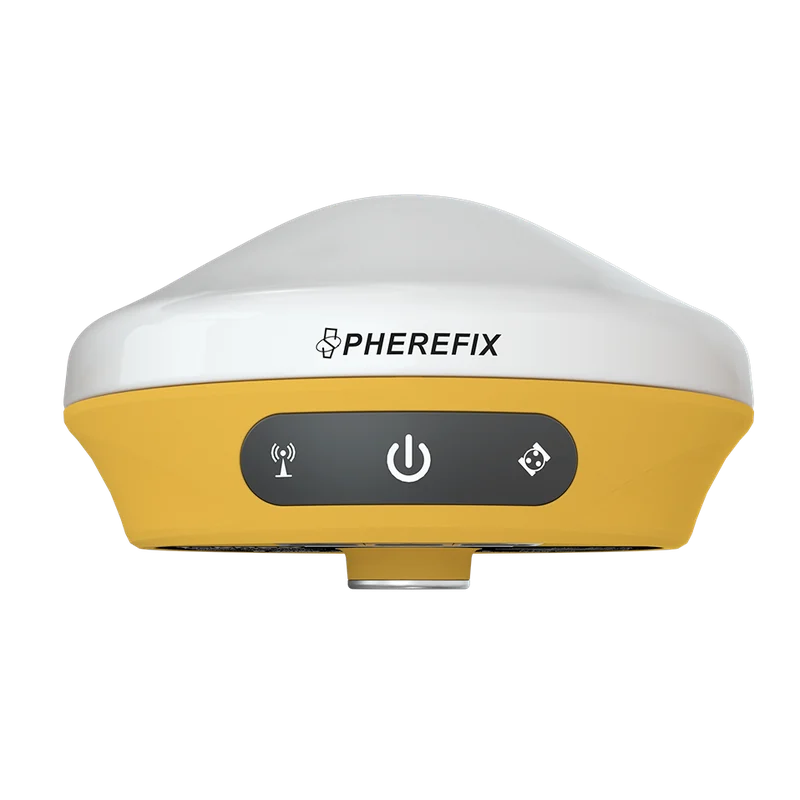
Overview
SP20 is a multifunctional RTK receiver for professional surveying teams that need reliable GNSS tracking, IMU tilt compensation, NFC configuration and integrated 4G communication in one field-ready device.
Specifications
1408 channelsFull-constellation supportIP68Ruggedness or deployment detail1408ChannelsIP68ProtectionSurveyingUse Case
Key Features
Feature summary for model comparison and purchase evaluation.IMU Tilt Surveying
Supports fast initialization and tilt measurement up to 60 degrees for more flexible point collection.
Full-Constellation Tracking
1408 channels receive GPS, GLONASS, BDS, Galileo, QZSS, SBAS and NavIC signals for stable positioning.
Built-in 4G Communication
Integrated cellular modem supports NTRIP and online correction workflows in common survey projects.
Easy Field Configuration
NFC and combined antenna design simplify setup for rover, base and dealer demonstration scenarios.
Applications
Use this section to match the product with real overseas buyer requirements.
Land Surveying
RTK measurement, stakeout, topographic survey and field data collection.

Construction Layout
Site positioning, road work, infrastructure layout and earthwork workflows.

GIS Mapping
Efficient data collection for GIS, assets and mapping projects.

Precision Agriculture
Field positioning support for agriculture and land operation.

Infrastructure
Road, utility, bridge and project control workflows.
Accessories
Accessory choices depend on model, application, target country and package requirement. Confirm the final configuration with Spherefix sales before quotation.
Data Controller
Match receiver with C100T, C500 or required field controller.

External Radio
Confirm radio, NTRIP or local correction workflow.

Pole / Tripod
Select field mounting accessories for survey operation.

Battery & Charger
Confirm package list and spare battery requirements.

Carrying Case
Packaging and protection for delivery and field use.
Radio Antenna
Choose radio antenna options for local correction workflows.
Resources
Request product files for evaluation, quotation and distribution.Need price, distributor support or product files?
Send model, target country, quantity and application. Spherefix sales will recommend the right product path.